

Linux sysadmin from India . Daily tips on Linux, Bash, SSH, AWS, DevOps & Tech News from 20+ yrs in the terminal. One practical command every day.
India
- Tweets 2,704
- Following 139
- Followers 177
- Likes 417

Quick Linux Tip 47 - I deleted a file 5 minutes ago and there's no backu... piped.video/kuI2bOHlDII?si=bkdH…
6
Quick Linux Tip #103
Q: Something is pegging my CPU. How do I pinpoint it with real-time refresh?
Try:`top -b -n 1 -o %CPU | head -20`
Info: Single snapshot sorted by CPU for quick checks.
Want to master Linux one command at a time?
Follow @linuxteck - 1 practical tip.

1
44
Running AI tools on a VPS: how much server do you actually need? piped.video/7h546MKq36k?si=rRNi…
16
Quick Linux Tip #102
Q: DNS is failing intermittently. How do I trace the resolution path?
Try:`dig +trace +noanswer google.com`
Info: Traces full DNS path to locate resolution delays.
Want to master Linux one command at a time?
Follow @linuxteck - 1 practical

1
14
Quick Linux Tip 46 - I'm about to make risky changes. How do I create a ...
piped.video/tUNbvzNeqy8?si=aeEi…
17
Quick Linux Tip 45 - My Windows files have wrong encoding on Linux. How ... piped.video/K1Z5tQbo0nk?si=OOjt…
20
Quick Linux Tip #101
Q: A single TCP connection seems slow. Can I measure its real throughput?
Try: `sudo iftop -i eth0 -nNP -f 'port 443'`
Info: top for bandwidth; tracks socket throughput
Want to master Linux one command at a time?
Follow @linuxteck - 1 practical Linux

18
Linux Tip 44 - Ping says fine… but your connections still stall? Check ...
piped.video/v_U97UqZ4xg?si=cUIn…
Ever chased a "random" slowdown? 👇
📌 Save this for your next slow-network day.
Follow @linuxteck for one Linux fix every day. linuxteck.com/linux-tips/
12
Quick Linux Tip 43 - How do I extract config values from between BEGIN a... piped.video/gGa8TGfp1PE?si=qYYJ… via @YouTube
24
Linux Tip #100
Q: I keep typing shutdown on the wrong server. How do I protect against this?
Info: `molly-guard` intercepts shutdown, reboot, and halt commands over active SSH connections and demands explicit hostname confirmation to prevent catastrophic human errors.

2
20
UEFI vs Legacy BIOS: Which Boot Mode Should You Use?
Read more: linuxteck.com/uefi-vs-legacy…
Understand the differences in boot methods, disk partitioning, compatibility, and security before installing Linux or troubleshooting boot issues.
#Linux #UEFI #BIOS #LinuxTips #LinuxTeck
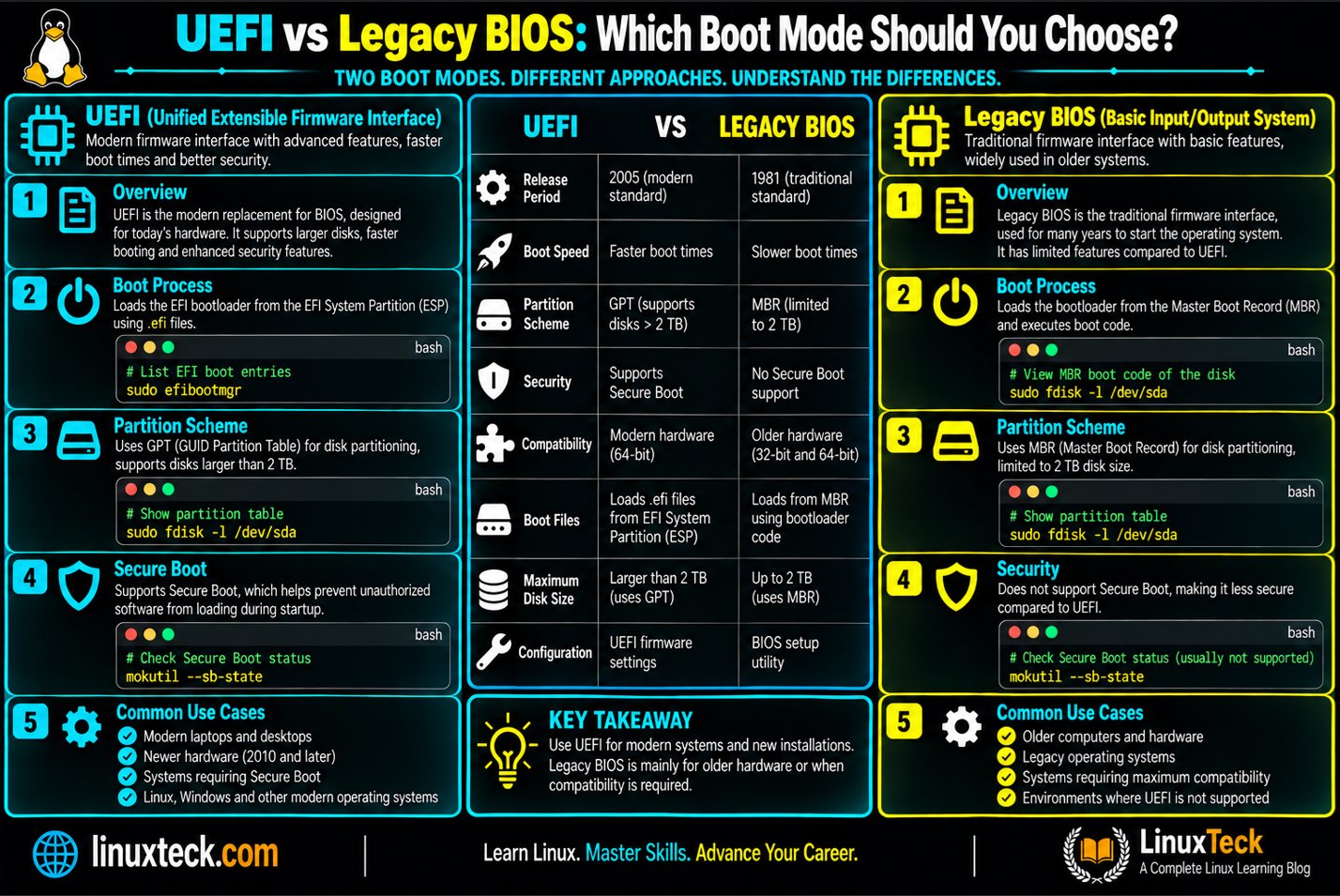
19
Quick Linux Tip 42 - How do I watch a long command run AND save its comp... piped.video/dc8AL5oii20?si=0k6M… via @YouTube
9
Quick Linux Tip #99
Q: How do I create a true incremental backup without using rsync?
Try:`tar --listed-incremental=/backup/snapshot.snar -czf /backup/incr_$(date +%Y%m%d).tar.gz /home/linuxteck`
Info: Tracks file state via .snar for incrementals.
Follow @linuxteck

1
16
Quick Linux Tip 41 - How do I find duplicate files even if they have dif... piped.video/Y_XYLoGqqQw?si=IYHd… via @YouTube
16
Quick Linux Tip #98
Q: Something keeps starting a process on my server. How do I catch it?
Try:`sudo execsnoop-bpfcc`
Info: eBPF traces exec() to catch ephemeral processes.
Want to master Linux one command at a time?
Follow @linuxteck

1
24
Quick Linux Tip 40 - Which files changed during the incident window last... piped.video/ljZDypnlrnk?si=cARr… via @YouTube
12
Quick Linux Tip #97
Q: My binary exists but Linux says 'command not found'. What's wrong?
Try:`file /usr/local/bin/mytool && ldd /usr/local/bin/mytool`
Info: ldd reveals missing shared library dependencies.
Want to master Linux one command at a time?
Follow @linuxteck

1
24
Quick Linux Tip 39 - How do I access a private database from my laptop t... piped.video/A9BEBRWbuo0?si=koz4… via @YouTube
14
Quick Linux Tip #96
Q: Who accessed "etc-shadow" and when, over the last week?
Try:`sudo aureport --file --start week-ago | grep shadow`
Info: Summarizes file audit reports and tracks login auid.
Want to master Linux one command at a time?
Follow @linuxteck - 1 practical Tip

1
16
Linux Tip #95
Question: Two servers behave differently. Which packages differ between them?
Try:`diff <(ssh linuxteck@server1 'dpkg -l | awk "/^ii/{print \$2}"' | sort) <(ssh linuxteck@server2 'dpkg -l | awk "/^ii/{print \$2}"' | sort)`
Follow @linuxteck - 1 practical Tip

1
22
Quick Linux Tip 37 - My backup is killing disk performance. How do I slo... piped.video/5KNJDHIVC7s?si=U154… via @YouTube
12
curl vs wget: Which Is Better?
linuxteck.com/curl-vs-wget/
Wget: downloads, retries, resuming & mirroring
cURL: APIs, HTTP requests, custom headers & scripting
Learn the key differences and practical Linux commands.
#Linux #Curl #Wget #LinuxTips #LinuxTeck

21
Quick Linux Tip 36 - My connection to a server is slow. Where in the net... piped.video/m3Xh952GqY4?si=nhu-… via @YouTube
16
Quick Linux Tip #94
Q: My server is low on RAM but has no swap partition. How do I add swap?
Try
`sudo fallocate -l 4G /swapfile`
`sudo chmod 600 /swapfile`
`sudo mkswap /swapfile`
`sudo swapon /swapfile`
Info: Instantly creates, secures, and activates swap files.
@linuxteck

1
16
Quick Linux Tip #93
Q: A command is slow. Which syscalls are eating all its time?
Try:`strace -c -w ls -laR /home 2>&1 >/dev/null | tail -20`
Info: Profiles syscall wall-clock time to catch I/O bottlenecks.
Want to master Linux one command at a time?
Follow @linuxteck

1
19
Quick Linux Tip 35 - My SSH key uses old RSA. How do I switch to a moder... piped.video/32K-cWEdisI?si=zu2-… via @YouTube
11
Web agency or freelancer with lots of client sites? 🧑💻 Stop paying for 15 separate hosting plans
Reseller hosting = 1 account → a separate cPanel for every client
Verpex reseller - linuxteck.com/go/verpex
#webagency #freelancewebdeveloper #resellerhosting #webhosting #verpex

20
IPv4 vs IPv6: What’s the Difference?
linuxteck.com/ipv4-vs-ipv6/
IPv4 vs IPv6 explained with practical Linux examples.
Compare address size, format, NAT, headers, ARP vs NDP, fragmentation, routing, and useful Linux commands.
#LinuxTeck #Linux #IPv4 #IPv6 #Networking

23
Quick Linux Tip 34 -How fast is my network really? Not just ping - actua... piped.video/FA3Ju0yFkSY?si=o1ys… via @YouTube
19

Quick Linux Tip #92
Q: A process is misbehaving. Can I dump its memory for post-mortem analysis?
Try:`sudo gcore -o /tmp/mysqld_dump 3456`
Info: gcore dumps process memory live without terminating it.
Want to master Linux one command at a time?
Follow @linuxteck

1
27
Top 10 Browsers for Linux in 2026 🌐
linuxteck.com/top-10-browser…
Which Linux browser fits your needs?
Firefox, Brave, LibreWolf, Zen, Chromium, Chrome, Vivaldi, Mullvad, Helium & Falkon - compared for privacy, compatibility, customization and lightweight performance.
#LinuxTeck

44
Quick Linux Tip #91
Q: I see unexpected open ports. What program is behind each one?
Try: `sudo ss -tulnp`
Info: Displays open TCP/UDP ports and assigned processes
Want to master Linux one command at a time?
Follow @linuxteck 1 practical Linux tip every day For #LinuxTips

1
20
Quick Linux Tip #90
Question: How do I measure DNS lookup, connect, and download time separately?
Info: curl -w uses variables to break down network latency.
Want to master Linux one command at a time?
Follow @linuxteck - 1 practical Linux tip every day. For more #LinuxTips

1
26
How to Choose VPS Hosting
linuxteck.com/how-to-choose-…
CPU, RAM & storage aren't enough when choosing a VPS.
Check network throughput, PPS limits, throttling policies, location, backups, scalability and management
Choose the VPS around your workload, not the headline specs.

22
Which Linux Desktop Environment Is Best for You?
linuxteck.com/best-linux-des…
GNOME vs KDE Plasma vs Xfce vs Cinnamon vs MATE vs LXQt vs Budgie vs COSMIC.
Which is best for your hardware and workflow?
#LinuxTeck #Linux #LinuxDesktop #OpenSource

63

Quick Linux Tip #89
Q: The kernel is using tons of RAM. Which modules are the biggest?
Try: `sudo lsmod | sort -k2 -rn | head -10`
Info: lsmod lists module sizes in bytes; sort to identify RAM hogs.
Want to master Linux one command at a time?
Follow @linuxteck

1
30
Quick Linux Tip #88
Q: My server clocks drift. How do I get millisecond-accurate time sync?
Try: `chronyc tracking`
Info: chrony replaces ntpd; tracking monitors clock drift & offset.
To master Linux one command at a time?
Follow @linuxteck - 1 practical Linux tip every day.

2
62
Why Does Linux Have So Many Package Managers?
linuxteck.com/why-so-many-li…
APT. DNF. YUM. Pacman. Zypper. apk.
Why so many package managers?
Here's a practical breakdown
#linuxteck #Linux #LinuxTips #LinuxCommands

1
27
Quick Linux Tip #87
Q: My server is swapping. Which processes are the culprits?
Try: `for pid in $(ls /proc/ | grep -E '^[0-9]+$'); do awk -v pid=$pid '/VmSwap/ {print pid, $2, $3}' /proc/$pid/status 2>/dev/null; done | sort -k2 -rn | head -10`

1
13
Quick Linux Tip #86
Q: Some files won't delete due to attributes. How do I find them?
Try: `sudo lsattr -R /var/log 2>/dev/null | grep -E '^-*[aiu]' | head -10`
Info: lsattr views file flags: i (immutable), a (append), and u (undeletable).
Follow @linuxteck for #LinuxTips

1
19
Quick Linux Tip #85
Q: How do I count new occurrences of an error over time?
Try: `watch -n 5 'grep -c "ERROR" /var/log/nginx/error.log'`
Info: watch tracks metric changes; tail -f | awk counts live log hits.
Follow @linuxteck for more #LinuxTips

1
19
Think You Know Linux Networking? Test Yourself.
linuxteck.com/linux-networki…
Can you troubleshoot a Linux network without guessing?
#linuxteck #LinuxNetworking #LinuxInterview

17
Quick Linux Tip #84
Q: Which system calls is a slow process making the most?
Try: `sudo perf trace -p 3456 --summary`
Info: perf trace --summary aggregates syscall latency with lower overhead than strace.
Follow @linuxteck for more #LinuxTips

1
20
Quick Linux Tip #83
Q: How do I create a compressed AND encrypted backup in one command?
Try: `tar -czf - /home/linuxteck/documents | openssl enc -aes-256-cbc -pbkdf2 -out backup.tar.gz.enc`
Info: tar -czf - streams archive to stdout for openssl to encrypt in-memory.

1
35
Quick Linux Tip #82
Q: After copying files, timestamps changed. How do I preserve them?
Try: `rsync -a --preserve-times /source/ /destination/`
Info: rsync -a copies exact file timestamps (mtime) and permissions.
Follow @linuxteck for more #LinuxTips

1
69
Quick Linux Tip #81
Q: My server hits 'too many open files' errors. Which process is the culprit?
Try: `sudo lsof | awk '{print $2}' | sort | uniq -c | sort -rn | head -10`
Info: lsof lists open files; grouping by PID counts open handles per process.
Follow @linuxteck

1
20
Quick Linux Tip #80
Q: My server ran out of disk. Which files grew the most in the last 24 hours?
Try: `sudo find / -type f -mtime -1 -size +100M -exec ls -lah {} \; 2>/dev/null`
Info: -mtime -1 filters last 24h, -size +100M finds files >100MB; ignores errors.

1
51
Quick Linux Tip #79
Q: How do I set 644 for files and 755 for directories in one shot?
Try: `find /var/www/site -type d -exec chmod 755 {} + && find /var/log/site -type f -exec chmod 644 {} +`
Info: Targets dirs (755) and files (644) separately using find.
Follow @linuxteck

1
1
10
Deprecated Linux Commands: What to Use Instead
linuxteck.com/deprecated-lin…
Still using some old Linux commands?
Learn commonly used commands are deprecated and what modern alternatives to use instead for networking, DNS, routing, remote access, & more
#linuxteck #Linux #LinuxTips

1
54
Best Linux VPS Hosting 2026: How to Choose the Right Provider
Full guide: linuxteck.com/best-linux-vps…
Need a Linux VPS? Compare providers by workload, price, performance, management, scalability, US locations, and support.
#linuxteck #Linux #VPS #LinuxVPS

27
Quick Linux Tip #78
Q: Which network interface is being overloaded?
Try: `sar -n DEV 1 5`
Info: sar -n DEV monitors real-time network traffic per interface.
Follow @linuxteck for more #LinuxTips click here linuxteck.com/linux-tips/

14
Quick Linux Tip #77
Q: How do I see all differences between production and my feature branch?
Try: `git log --oneline --left-right --graph main...feature/new-api`
Info: ... shows symmetric difference; --left-right tags side (</>).
Follow @LinuxTeck for more #LinuxTips

1
24
Quick Linux Tip #76
Q: I need SSL for local development. How do I generate a certificate quickly?
Try: `openssl req -x509 -newkey rsa:4096 -keyout key.pem -out cert.pem -sha256 -days 365 -nodes -subj '/CN=localhost'`
Info: Creates a 1-year self-signed SSL cert without prompts

1
1
27
Quick Linux Tip #75
Q: My high-priority process needs dedicated cores. How do I pin it to specific CPUs?
Try: `taskset -cp 0,1 3456`
Info: taskset binds processes to cores via -c and -p (PID).
Follow @linuxteck for more #LinuxTips

1
28